
Google Sheets guide
How to sync Trello to Google Sheets
Keep selected Trello cards in a Google worksheet, with room for your own formulas and notes.
Board Export+ writes updates from Trello to Google Sheets. Editing a spreadsheet cell does not change Trello. Use sync for recurring reporting; choose a CSV export and manual import when you only need a one-time copy.
Before you start
Install Board Export+, open a board you can access and select Google Sheets. You need a Google account with permission to edit the destination spreadsheet, plus an active Pro trial or Pro license.
Connect your board and worksheet
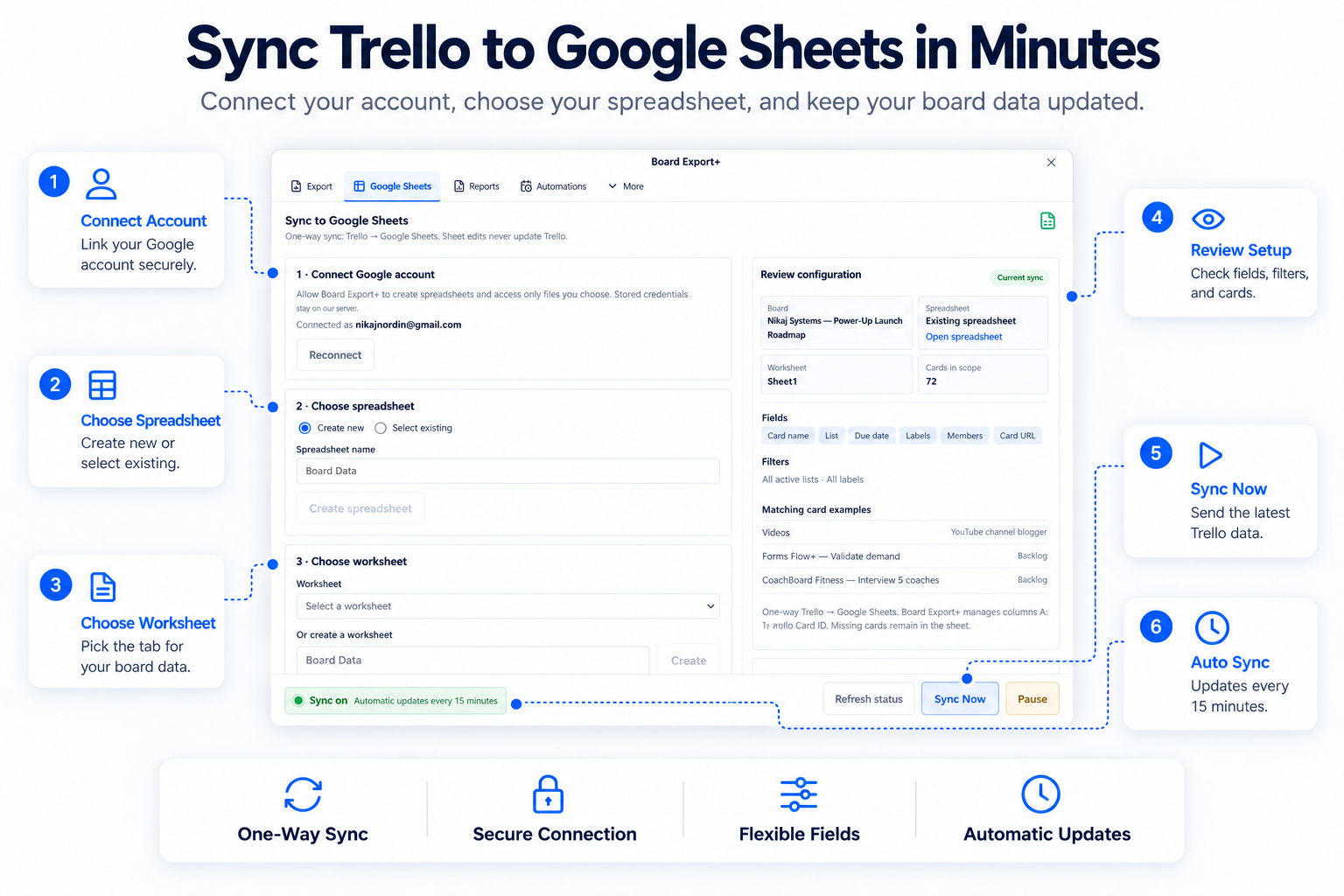
- Select Connect Google account and complete Google authorization. Return to Board Export+ to check the connection.
- Choose Create new and name a spreadsheet, or use Select existing to choose a file in Google Picker.
- Select a worksheet or create a new one. Start with an empty worksheet so the managed columns have the expected headers.
- Choose the Trello fields to sync. Use the optional list and label filters to limit the active cards included.
- Review the destination, fields and filters, confirm the review, then start the sync.
- Wait for the initial run to complete and inspect its history. Use Sync now for another update; pause or resume automatic updates from the sync controls.
What appears in your spreadsheet
Column A holds the Trello Card ID. Columns B–I hold Card, List, Due, Done, Labels, Members, Card URL and Description. These positions stay fixed; fields you leave unchecked have empty cells. Done records the card’s due-complete flag, independently of its list name.
| Trello Card ID | Card | List | Due | Done | Labels | Members | Card URL | Description |
|---|---|---|---|---|---|---|---|---|
| demo-card-001 | Review homepage copy | In progress | 2026-11-10T12:00:00.000Z | false | Client review | Alex Demo | https://example.com/demo-card-001 | Check the headline and approve the final call to action. |
| demo-card-002 | Approve launch checklist | Done | — | true | Launch | Sam Demo | https://example.com/demo-card-002 | The client has approved the launch sequence. |
Download the exact sample rows as JSON. For the same board as a readable document, open the sample PDF.
Keep your formulas and notes safe
Reserve A:I for Board Export+. Put your own formulas and notes in J onward. Sync matches existing rows by Trello Card ID, updates matching cards and appends new ones. Do not change the managed headers or delete or duplicate card IDs.
Rows for cards that were deleted, archived or excluded by a filter remain in the sheet. Sync does not delete those old rows, so the worksheet is not an exact live count of the board. Pause the sync before restructuring its worksheet.
Fix common sync problems
Google asks me to reconnect
Use Connect Google account again and select the account that can edit the file. If authorization is blocked or the feature is unavailable for your account, contact support@nikaj.dev; use CSV import for an immediate one-time copy.
The worksheet headers or card IDs conflict
Restore the A:I headers and unique IDs, or choose a new empty worksheet. The sync stops when it finds conflicting IDs or headers rather than clearing your data.
A card is missing or an old row remains
Check list and label filters, card archive status and the latest completed run. Archived cards are excluded from managed rows; old rows are retained when cards stop matching.
Can I stop updates or disconnect Google?
Pause stops automatic updates. Disconnect removes stored Google credentials and pauses your syncs. Spreadsheet data already written stays in Google Sheets.
Trial and pricing
Try Pro for 14 days without a card. Trial expiry does not charge you. Personal Pro is USD $5/month or $19/year per Trello user, across unlimited accessible boards and workspaces. Workspace Pro is USD $6/month or $24/year for all members and boards in one Trello workspace. Applicable taxes are added at checkout. Paid plans renew until canceled.
PDF exports and Google Sheets sync require Pro after the trial. Free then allows up to 5 successful CSV or JSON exports total per Trello account; this allowance does not reset monthly. Compare plans and billing terms.
Try Board Export+ in TrelloFor reports you can send directly to a client, see export Trello to PDF.