Export Trello to Excel
Analyze Trello cards in a native Excel workbook.
 Board Export+by Nikaj
Made for your Trello workflow
Turn Trello boards, lists, and cards into readable reports and useful files. Export when you need to, or let Pro schedules handle the routine.
14-day Pro trial · No card required · Then 5 total free CSV or JSON exports per Trello account
Analyze Trello cards in a native Excel workbook.
Move Trello card data into spreadsheets and other tools.
Share a readable Trello report with clients and teammates.
Keep a structured snapshot of Trello data.
Create documents, images, or attachment packages from Trello.
Installation instructions · Product documentation
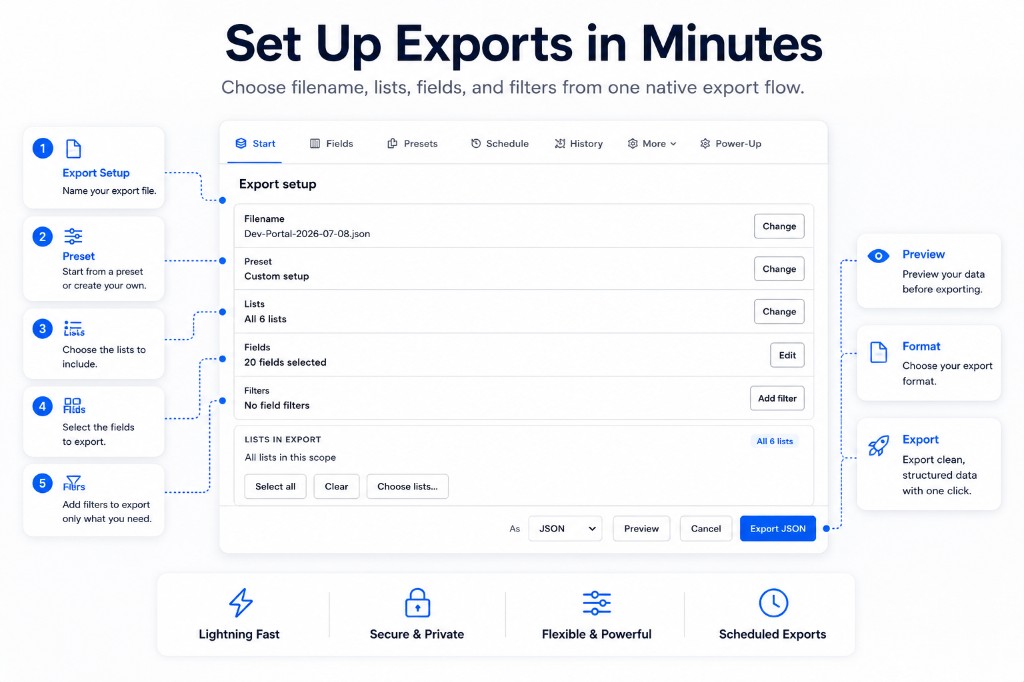
See it in action
Two short walkthroughs with English voiceover. Start with the export guide, then explore what else Board Export+ can do.
Start here
Choose lists and fields, reuse presets, preview your report, and export.
Watch on YouTube ↗Next steps
Set up scheduled delivery, find past exports, add branding, and include checklists.
Watch on YouTube ↗Scheduled exports and automated delivery require Pro. Videos load from YouTube when you press play. Browse all video guides ↗
Work at board, list, or card level, with formats for sharing and further analysis.
Pro adds scheduled exports, email and webhook delivery, and advanced reports.
One account, unlimited boards across all workspaces. No per-board fees.
Free or Pro
Pro covers your Trello account on every board you can access, across all workspaces. Choose monthly or yearly billing.
Free
$0
Up to 5 successful exports total in CSV or JSON per Trello account after the Pro trial.
Personal Pro · One user, unlimited boards
$19 / year
USD, per user. Renews annually until canceled.
Workspace Pro covers all boards and members in one workspace. Contact us for pricing and a custom quote.
Contact us for pricing. Existing workspace subscriptions keep their current coverage and billing terms.
Applicable taxes are calculated at checkout. Try Pro in Trello for 14 days without a card. Trial expiry does not charge you; you can then make up to 5 total free CSV or JSON exports per Trello account. Subscribing starts paid billing immediately, even if your trial has time remaining.
To subscribe, open Settings in Board Export+, choose Monthly or Yearly, and select Upgrade. Already subscribed? Manage your existing subscription.

Personal Pro is licensed per user on unlimited boards across all workspaces. Teammates who need their own access can buy Pro, or your team can choose a license covering one workspace.
No. The 14-day trial does not require a card. When it ends, you can make up to 5 free CSV or JSON exports in total per Trello account. A paid subscription starts only when you complete checkout.
Choose a billing frequency and review your license in Paddle Checkout. Paddle is the merchant of record and handles payment, applicable sales tax, and receipts.
Yes. The purchaser can open Manage billing from Board Export+ settings to cancel future renewals. See the refund policy for refund terms.